Language-ready workbooks
Create workbook labels users can read in their own language.
Generate user-facing labels, instructions, dropdown values and printable text in supported Indian languages while keeping formulas and structure stable.
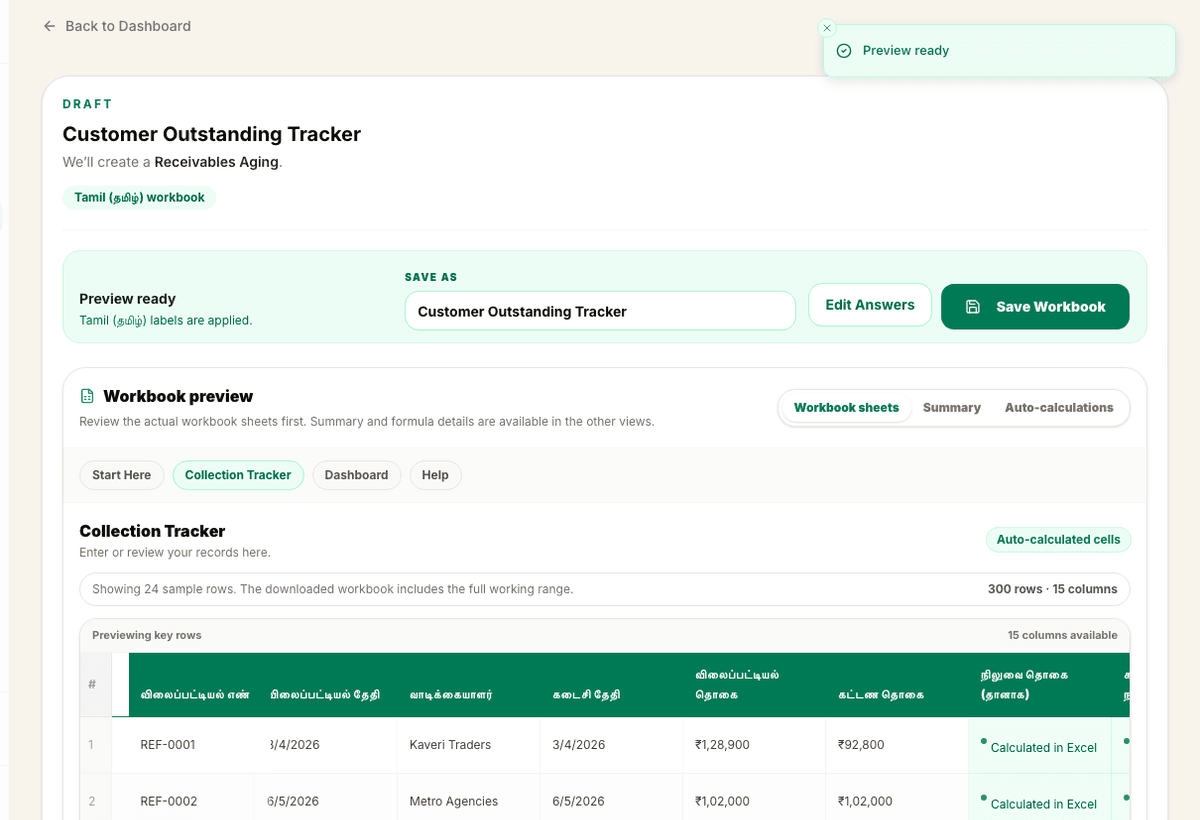
Preview
Language output
3 sample rows show the shape before users commit.
Validation
Checked output
Regional output is validated against expected workbook structure.
Included
6 core areas
Regional workbook labels
Problem
Why this feature exists
Many workbooks are used by staff, parents, shop workers or field teams who are more comfortable with Indian languages. English-only labels can make a useful workbook harder to adopt even when the formulas are correct.
Approach
How WorkbookWise handles it
WorkbookWise supports regional-language workbook output for user-facing labels, instructions, dropdown values and printable text while keeping formulas, workbook structure and validation stable.
Outcomes
What you can accomplish
Who it is for
Built around real workbook owners
Retail shops
Need local-language labels for staff entering stock, sales or payment data.
Schools
Need parent-facing receipts, fee labels or office workbooks in regional language.
Clinics
Need simple localized billing or appointment fields for front-desk use.
Accountants
Need workbook formats that clients and staff can understand quickly.
Common workflows
Common tasks you can complete
How it works
From input to useful output
Choose workbook path
Start from ready-made, custom or printable flow depending on the job.
Select language
Pick the supported Indian language for user-facing workbook output.
Generate localized labels
Labels, instructions, dropdown values and printable text are localized where supported.
Validate workbook structure
The workbook still needs correct formulas, sheets and validation after translation.
Download and review
Users should review local terms before sharing the workbook with staff or customers.
Product example
Customer Dues Tracker in Regional Output
The workbook remains the same operating tracker, but staff-facing labels and choices become easier to read.
Language proof
What changes in the workbook?
Regional output changes the words people read: sheet titles, column labels, dropdown values, help notes and printable text. Formula cells stay in normal Excel format.
| Part | English | Hindi | Tamil |
|---|---|---|---|
| Workbook title | Customer Dues Tracker | ग्राहक बकाया ट्रैकर | வாடிக்கையாளர் பாக்கி பதிவு |
| Column label | Due Amount | बकाया राशि | நிலுவை தொகை |
| Dropdown value | Part Paid | आंशिक भुगतान | பகுதி கட்டணம் |
| Help text | Enter payment follow-up date | भुगतान फॉलो-अप तारीख दर्ज करें | கட்டண தொடர்பு தேதியை உள்ளிடவும் |
| Formula cell | =MAX(0,E2-F2) | =MAX(0,E2-F2) | =MAX(0,E2-F2) |
Part
English
Hindi
Tamil
Part
English
Hindi
Tamil
Part
English
Hindi
Tamil
Part
English
Hindi
Tamil
Part
English
Hindi
Tamil
Hindi
हिन्दी
ग्राहक बकाया ट्रैकर
Tamil
தமிழ்
வாடிக்கையாளர் பாக்கி பதிவு
Telugu
తెలుగు
వినియోగదారు బకాయి ట్రాకర్
Kannada
ಕನ್ನಡ
ಗ್ರಾಹಕ ಬಾಕಿ ಟ್ರ್ಯಾಕರ್
Malayalam
മലയാളം
ഉപഭോക്തൃ കുടിശ്ശിക രജിസ്റ്റർ
Marathi
मराठी
ग्राहक थकबाकी नोंद
Gujarati
ગુજરાતી
ગ્રાહક બાકી રજીસ્ટર
Bengali
বাংলা
গ্রাহকের বকেয়া রেজিস্টার
Included
What the flow covers
Trust notes
What it does
Core capabilities
Localize sheet titles, column labels, help notes, dropdown values and printable labels.
Support English plus 8 Indian language output paths for launch.
Keep formulas, validation and workbook structure consistent while visible text changes.
FAQ
Frequently asked questions
Does regional output translate formulas?
No. User-facing text is localized while formulas and workbook structure stay stable.
Which parts can be localized?
Labels, instructions, dropdown values and printable text can be localized where supported.
Is the workbook still validated?
Yes. Regional output is checked so translated user-facing text does not break workbook structure.
Can I use regional output with printable docs?
Yes. Printable text is one of the important regional output paths.
Should I review translated text?
Yes. Business-specific local terms should be reviewed before sharing the workbook widely.
Related features
Continue exploring WorkbookWise
Create Workbook
Use the guided workbook helper when the ready-made library is not enough. If a template fits but your old data needs importing, use the separate Use My Data workflow instead.
Printable Docs
Build invoices, receipts, quotations, salary slips, fee receipts, challans and vouchers as printable documents connected to workbook data.
Google Sheets Export
Export ready-made and saved workbooks to Google Sheets or copy them to Drive after connecting Google, while keeping XLSX download as the stable source.
Related Excel formats
Start from a matching free workbook
Attendance
attendance sheet format in Excel
Use this attendance sheet format when staff, students or shift teams need a clean monthly register that can support payroll, leave review or class attendance follow-up.
HR and payroll
salary slip format in Excel
Use this salary slip format when payroll is still prepared in Excel and the team needs a clearer monthly structure before payslip generation or accountant review.
Receipts and documents
rent receipt format in Excel
Use this rent receipt format when monthly rent records need a clear Excel structure for receipt tracking, payment confirmation or document preparation.
GST and invoices
GST invoice format in Excel
Use this GST invoice format as an invoice register for tracking tax invoice details, GST values and payment follow-up. It is not a final printable invoice layout by itself.
Ready to use Regional Output?
This page explains the workflow in detail. The app is where the user creates, downloads, saves or exports the workbook.