Custom workbook builder
Describe the workbook. Preview it before saving.
Use the guided workbook helper when the ready-made library is not enough. If a template fits but your old data needs importing, use the separate Use My Data workflow instead.
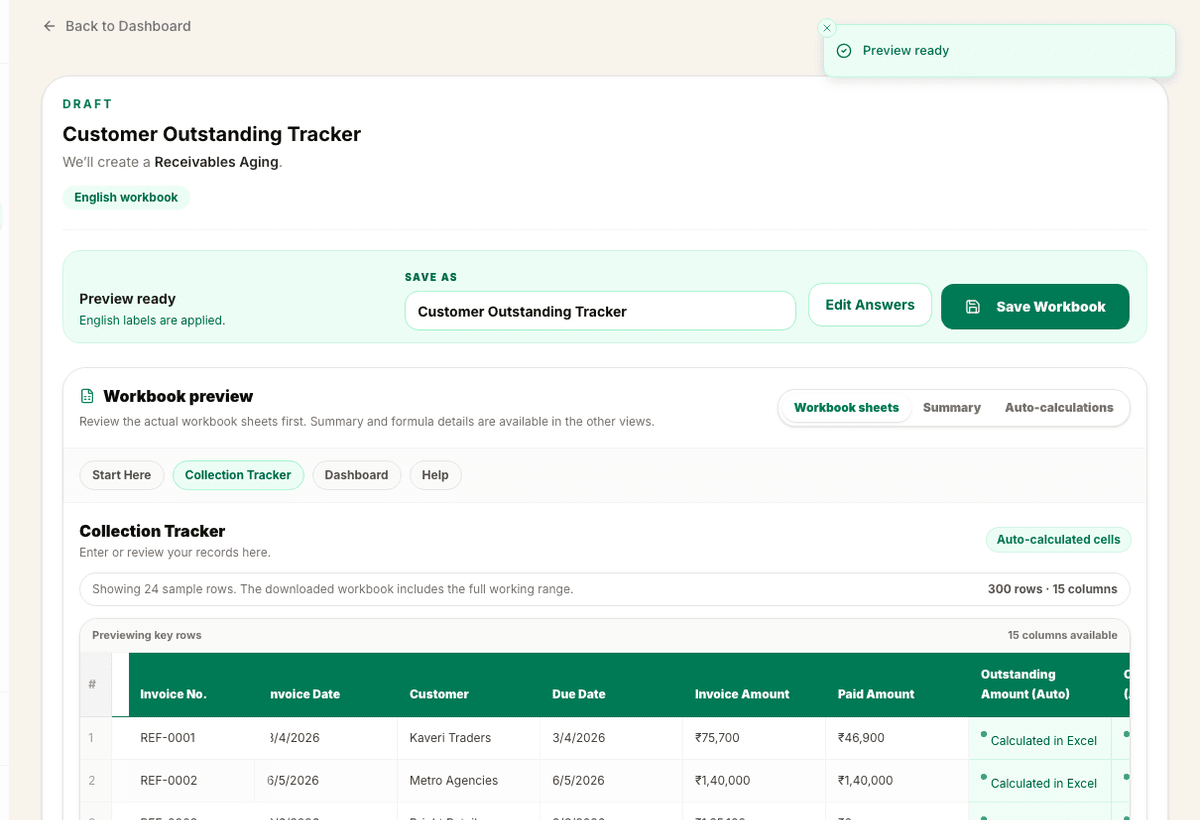
Preview
Guided build
3 sample rows show the shape before users commit.
Validation
Checked output
WorkbookWise validates the downloadable XLSX, not just the draft preview.
Included
6 core areas
Plain-language workbook request
Problem
Why this feature exists
Some workbook needs are too specific for a generic template. Users may need local column names, a particular approval flow, a custom due-date rule, or a workbook that matches how their office already talks about the work.
Approach
How WorkbookWise handles it
Create Workbook turns a plain requirement into a guided workbook flow. It asks only for details that affect the output, shows a preview, validates the final XLSX, and saves the file privately when the user is ready. If the user already found a matching template and only needs old data imported, the Use My Data path is clearer.
Outcomes
What you can accomplish
Who it is for
Built around real workbook owners
Small business owners
Need a tracker that matches their exact sales, customer, stock or collection process.
Accountants
Create client-specific registers without rebuilding the same structure repeatedly.
Office administrators
Build attendance, fee, receipt, vendor or document trackers for daily use.
Regional teams
Need workbook labels or printable text in a supported Indian language.
Common workflows
Common tasks you can complete
How it works
From input to useful output
Describe the workbook
Write the practical job, such as customer dues, stock movement, salary slips or GST purchase tracking.
Answer focused questions
Confirm only the fields, language, printable output or business details that change the workbook.
Review the preview
Inspect sheets, columns, dropdowns, formulas and summaries before creating the final file.
Validate and save
WorkbookWise checks the downloadable XLSX and saves it privately when it passes the path.
Download or export
Use the file in Excel, keep it in My Workbooks, or use supported Google Sheets handoff.
Product example
Customer Outstanding Tracker
A custom workbook can turn a common business sentence into columns, formulas and status fields that match the user job.
Included
What the flow covers
Trust notes
What it does
Core capabilities
Turn a plain-English requirement into a workbook structure.
Use guided questions only when details are missing.
Stay separate from Use My Data, which starts from an existing template and uploaded file.
Save the final workbook under My Workbooks.
FAQ
Frequently asked questions
Is this an arbitrary workbook generator?
No. Launch custom workbooks stay on controlled compiler and validation paths rather than exposing unsupported creation paths.
Should I use Create Workbook or Use My Data?
Use Create Workbook when you need a new structure. Use My Data when a ready-made template already fits and you want your existing Excel or CSV records mapped into it.
Can I preview before saving?
Yes. The flow is designed around preview first, then save and download.
Can it ask follow-up questions?
Yes. The page asks focused questions only when the answer changes the workbook.
Where are custom workbooks saved?
Saved custom files appear under My Workbooks for the signed-in user.
Can I create regional-language workbooks?
Yes. Supported regional output paths can localize user-facing workbook labels and text.
Related features
Continue exploring WorkbookWise
Capture To Excel
Paste business text, upload an invoice image, or upload a PDF bill. WorkbookWise extracts structured rows, flags uncertain values, and lets users download or save reviewed Excel output.
Fix My Excel
Upload an Excel or CSV file, keep the original rows, and create a cleaner workbook with mapped columns, formulas, dropdowns, summaries and help notes. Use My Data is the template-specific version when you already picked a target workbook.
Regional Output
Generate user-facing labels, instructions, dropdown values and printable text in supported Indian languages while keeping formulas and structure stable.
Related Excel formats
Start from a matching free workbook
Projects
project task tracker format in Excel
Use this project task tracker format in Excel when agencies, contractors and internal teams need a clean workbook for tasks, owners, priority, status, due dates and blockers before review, sharing, filing or monthly reporting.
Sales CRM
lead tracker format in Excel
Use this lead tracker format in Excel when sales teams, agencies and owners need a clean workbook for lead source, owner, stage, next follow-up and deal value before review, sharing, filing or monthly reporting.
Finance
monthly budget format in Excel
Use this monthly budget format in Excel when families, freelancers and small businesses need a clean workbook for planned budget, actual spend, category variance and review notes before review, sharing, filing or monthly reporting.
Finance
cash flow forecast format in Excel
Use this cash flow forecast format when owners, finance teams or founders need to estimate opening balance, expected inflows, expected outflows and closing cash by date or week.
Ready to use Create Workbook?
This page explains the workflow in detail. The app is where the user creates, downloads, saves or exports the workbook.