Formula helper
Get the formula first, with the example after it.
Create, explain or fix Excel and Google Sheets formulas. The answer stays copy-ready, with a sample sheet example below for context.
Preview
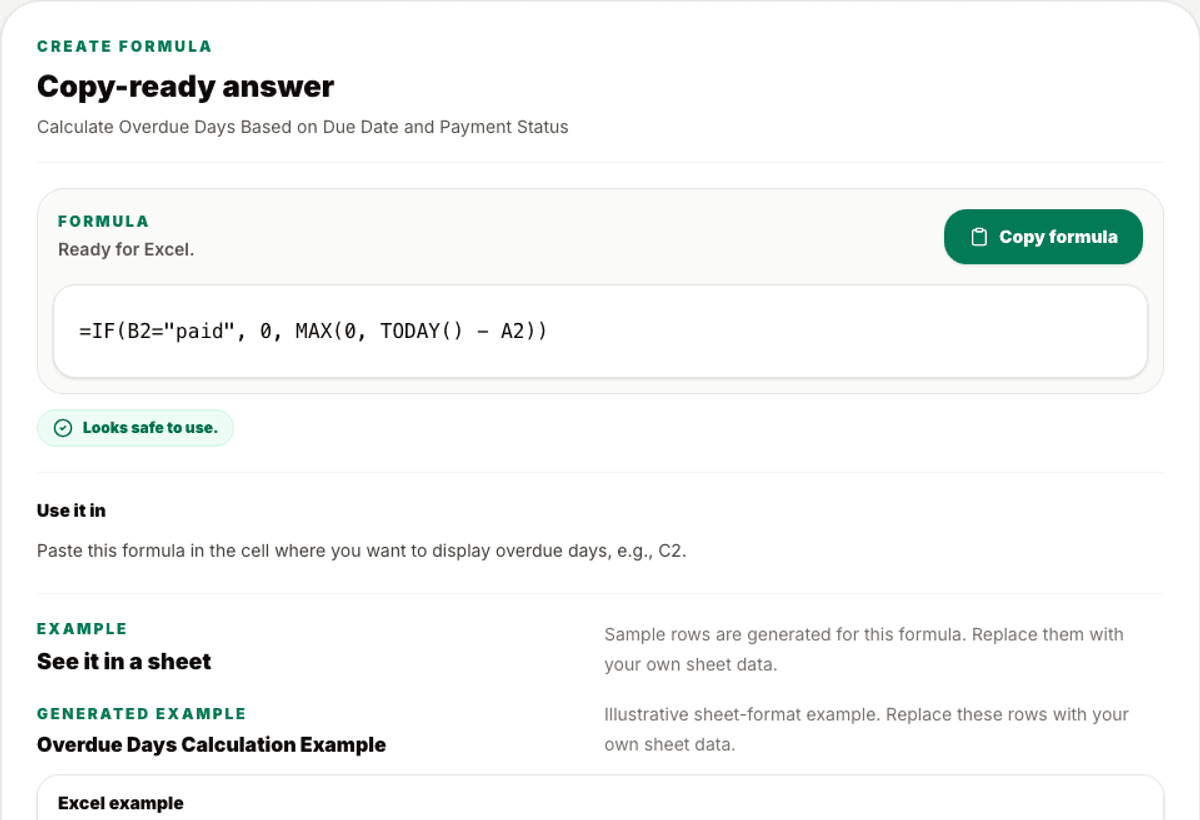
Copy-ready formula
3 sample rows show the shape before users commit.
Validation
Checked output
Warnings call out formula limits and assumptions.
Included
6 core areas
Create formula mode
Problem
Why this feature exists
Formula help often buries the actual formula under explanations or shows fake tables before the user gets the answer. Business users usually need the copy-ready formula first, then a small example to confirm how it behaves.
Approach
How WorkbookWise handles it
WorkbookWise keeps Formula output answer-first. The formula is the primary result, followed by usage notes, assumptions, warnings and a generated sheet-format example when it helps explain the logic.
Outcomes
What you can accomplish
Who it is for
Built around real workbook owners
Excel users
Need IF, lookup, date, text, GST, TDS or cleanup formulas quickly.
Google Sheets users
Need formulas adjusted for Sheets syntax or behavior.
Accountants
Need tax, due date, overdue, split and reconciliation helper formulas.
Office teams
Need practical formulas explained in plain language before using them in live files.
Common workflows
Common tasks you can complete
How it works
From input to useful output
Describe the calculation
State the columns and the result needed in normal language.
Get the formula first
The copy-ready answer is shown before the table-style example.
Read assumptions
Check which cells or columns the formula expects, such as date in A2 or status in B2.
Review warnings
See syntax, version or safety notes before applying the formula to live rows.
Use the example
The generated table demonstrates the output without asking users to invent sample data.
Product example
Overdue Days Formula
The formula returns zero for paid invoices and calculates overdue days only when the due date has passed.
Included
What the flow covers
Trust notes
What it does
Core capabilities
Create formulas from plain language.
Explain or fix formulas that are failing.
Show generated sample rows without asking users to invent data first.
FAQ
Frequently asked questions
Will the page ask me to provide sample rows?
No. The helper should generate illustrative sample rows when needed instead of blocking the preview.
Does it support Google Sheets?
Yes. Users can choose Excel or Google Sheets and ask for conversion where supported.
Can it fix an existing formula?
Yes. Paste the formula and describe what is wrong or what result you expected.
Why is the table below the formula?
The formula is the copy-ready output. The table is supporting context, not the main answer.
Does it warn about risky formulas?
The output includes assumptions, safety notes and warnings when formula behavior depends on data format, version or exact text matches.
Related features
Continue exploring WorkbookWise
Scripts
Generate VBA macros or Google Apps Script for spreadsheet automation. Copy the script first, then follow setup, undo and safety sections.
Create Workbook
Use the guided workbook helper when the ready-made library is not enough. If a template fits but your old data needs importing, use the separate Use My Data workflow instead.
Template Gallery
Browse the WorkbookWise template library, preview the workbook shape, then download XLSX files or supported ZIP bundles when it fits your work.
Related Excel formats
Start from a matching free workbook
Finance
loan EMI tracker format in Excel
Use this loan EMI tracker format in Excel when owners, accountants and personal finance users need a clean workbook for loan EMI dates, principal, interest, paid status and balance review before review, sharing, filing or monthly reporting.
Reports
profit and loss format in Excel
Use this profit and loss format when owners or finance teams need a simple Excel statement for income, cost of goods sold, operating expenses, gross profit and net profit review.
Restaurant
recipe costing format in Excel
Use this recipe costing format in Excel when restaurants, bakeries and cloud kitchens need a clean workbook for ingredient costs, serving yield, margin and selling price review before review, sharing, filing or monthly reporting.
HR and payroll
payroll register format in Excel
Use this payroll register format in Excel when HR and accounting teams need a clean workbook for monthly payroll rows, earnings, deductions, net pay and approval status before review, sharing, filing or monthly reporting.
Ready to use Formula?
This page explains the workflow in detail. The app is where the user creates, downloads, saves or exports the workbook.