Printable document builder
Create business documents that are ready to print.
Build invoices, receipts, quotations, salary slips, fee receipts, challans and vouchers as printable documents connected to workbook data.
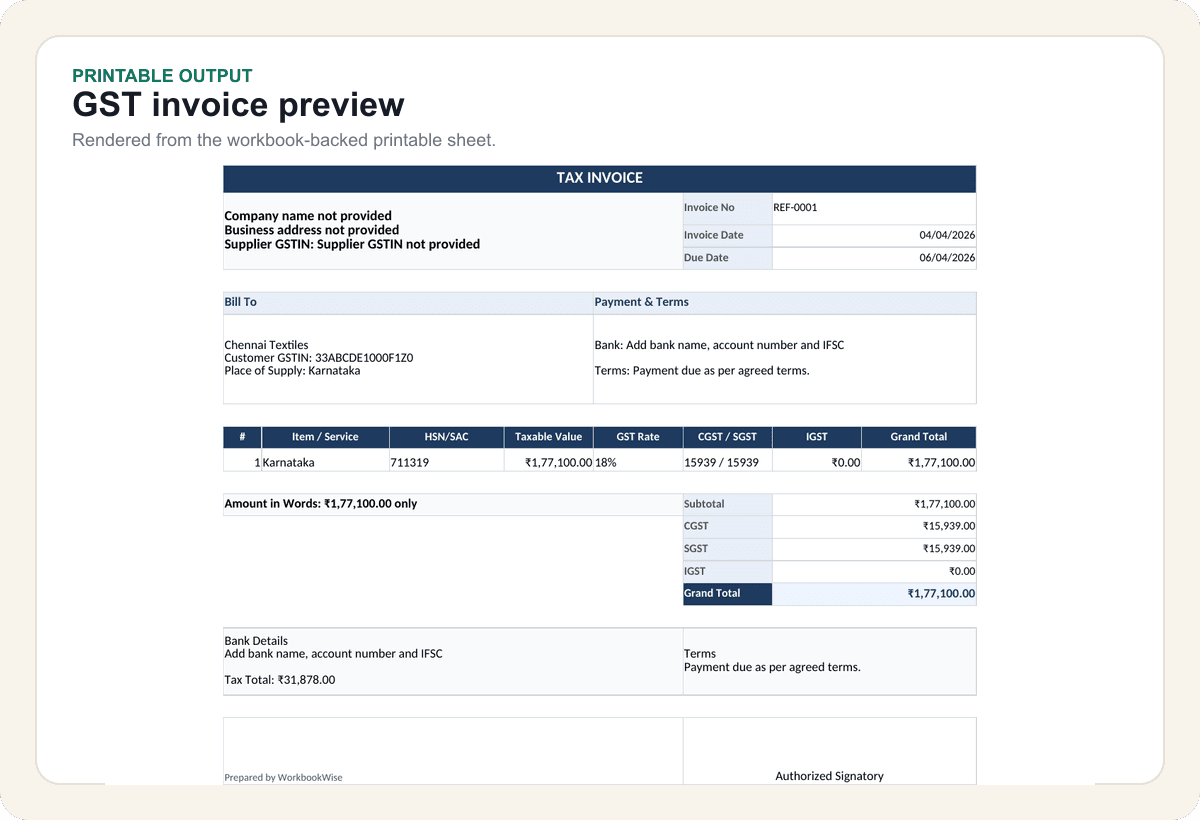
Preview
Printable formats
3 sample rows show the shape before users commit.
Validation
Checked output
Printable contracts keep formats predictable.
Included
6 core areas
Invoice, receipt and quotation paths
Problem
Why this feature exists
Printable business documents often start as copied invoice formats with broken spacing, missing fields, inconsistent totals or labels that do not fit the local workflow. Users need print-ready documents backed by clean workbook data.
Approach
How WorkbookWise handles it
WorkbookWise lets users choose a document type first, then enter only the details needed for that output. The result is a printable document connected to workbook data such as an invoice, receipt, quotation, salary slip, fee receipt, challan or voucher.
Outcomes
What you can accomplish
Who it is for
Built around real workbook owners
Retail and service businesses
Need invoices, receipts, quotations and payment documents.
Schools and coaching centres
Need fee receipts, challans, attendance notes and parent-facing formats.
HR and admins
Need salary slips, reimbursement vouchers and staff documents.
Accountants
Need reusable printable formats for clients without recreating layouts.
Common workflows
Common tasks you can complete
How it works
From input to useful output
Choose document type
Start with the output the user wants to print, not a generic workbook form.
Enter document details
Fill the required business, customer, item, payment or employee fields.
Preview workbook output
Check the layout connected to workbook data and supporting data before final download.
Use regional labels if needed
Apply supported language output for user-facing labels and printable text.
Download and print
Open the XLSX in Excel or a compatible spreadsheet app and print from the prepared sheet.
Product example
Printable Invoice Workbook
A printable document combines entry fields, calculated totals and a print-focused sheet.
Included
What the flow covers
Trust notes
What it does
Core capabilities
Pick the document type before entering details.
Generate printable sheet connected to workbook datas.
Use regional output when user-facing labels need localization.
FAQ
Frequently asked questions
Is Printable Docs separate from workbooks?
No. The output is connected to workbook rows, so users can keep data and printable layout together.
Which document types are supported?
Launch scope includes invoices, receipts, quotations, salary slips, fee receipts, challans and vouchers.
Can labels be regional-language?
Supported regional output can localize user-facing labels and printable text.
Can I edit the output?
Yes. The result is an XLSX workbook that can be adjusted after download.
Does it replace professional compliance review?
No. Users should review tax and legal fields before sending official documents.
Related features
Continue exploring WorkbookWise
Regional Output
Generate user-facing labels, instructions, dropdown values and printable text in supported Indian languages while keeping formulas and structure stable.
Business Packs
Business packs group related templates for shops, clinics, schools, restaurants, freelancers and operations teams so users do not search file by file.
Create Workbook
Use the guided workbook helper when the ready-made library is not enough. If a template fits but your old data needs importing, use the separate Use My Data workflow instead.
Related Excel formats
Start from a matching free workbook
GST and invoices
GST invoice format in Excel
Use this GST invoice format as an invoice register for tracking tax invoice details, GST values and payment follow-up. It is not a final printable invoice layout by itself.
Sales documents
quotation format in Excel
Use this quotation format when you need a clear Excel quotation register with customer details, line values, GST/tax notes, validity and conversion status before sending a final quote.
Receipts and documents
rent receipt format in Excel
Use this rent receipt format when monthly rent records need a clear Excel structure for receipt tracking, payment confirmation or document preparation.
HR and payroll
salary slip format in Excel
Use this salary slip format when payroll is still prepared in Excel and the team needs a clearer monthly structure before payslip generation or accountant review.
Ready to use Printable Docs?
This page explains the workflow in detail. The app is where the user creates, downloads, saves or exports the workbook.