Grouped workbooks
Download the workbook set for one business job.
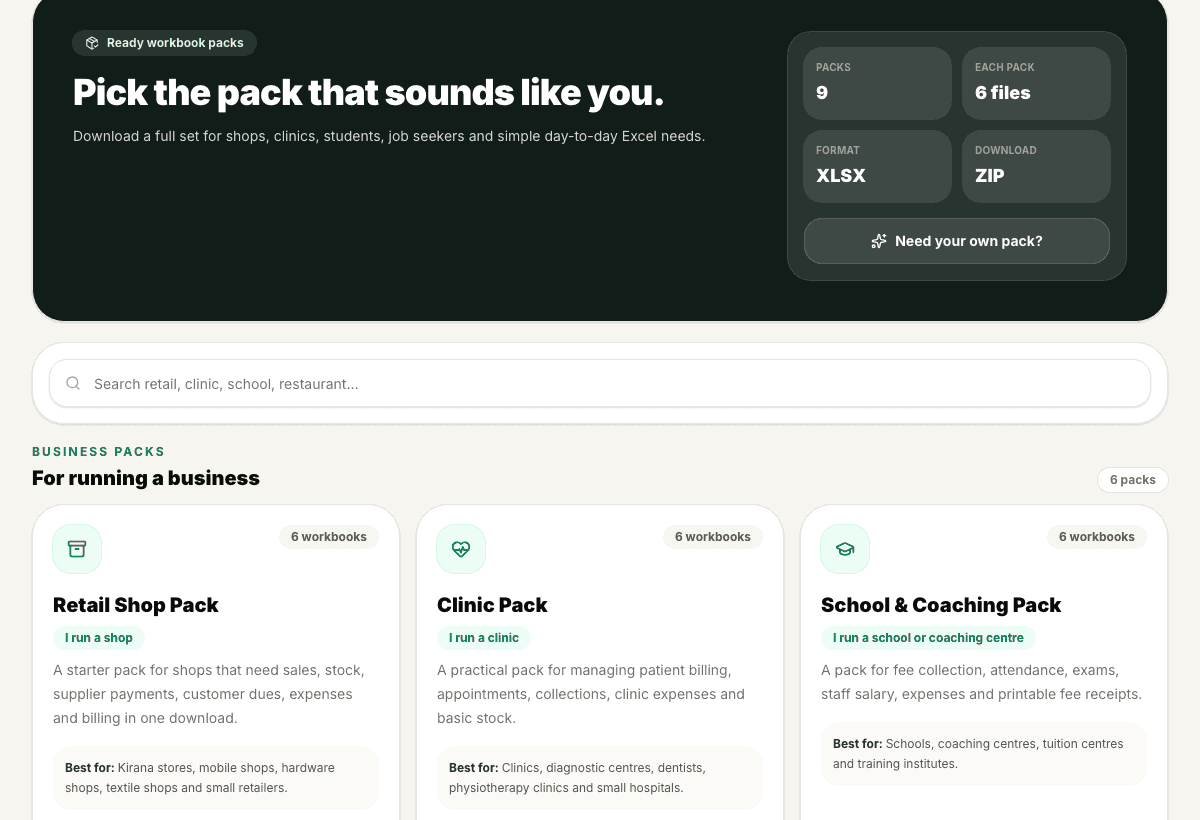
Business packs group related templates for shops, clinics, schools, restaurants, freelancers and operations teams so users do not search file by file.
Preview
Pack contents
3 sample rows show the shape before users commit.
Validation
Checked output
Packs use the same validated workbook pipeline as the template gallery.
Included
6 core areas
Business-type pack cards
Problem
Why this feature exists
A business rarely needs just one sheet. A shop may need sales, stock, purchase and customer dues. A clinic may need billing, appointments, expenses and medicine expiry. Searching for each file separately makes the setup feel scattered.
Approach
How WorkbookWise handles it
Business Packs group related workbooks around a business type or operating job. The user starts with a practical bundle, reviews what is inside, and downloads the set that matches their work.
Outcomes
What you can accomplish
Who it is for
Built around real workbook owners
Retail shops
Sales, purchase, stock, supplier payments and customer outstanding files.
Clinics
Patient billing, appointments, medicine stock, receipts and expense registers.
Schools and coaching centres
Fee collection, attendance, marks, staff salary and receipt workbooks.
Freelancers and agencies
Quotations, invoices, projects, expenses and follow-up trackers.
Common workflows
Common tasks you can complete
How it works
From input to useful output
Pick the business type
Choose the pack closest to the user workflow rather than starting from a blank search.
Review included files
See which workbooks are included and what each one is meant to handle.
Download the bundle
Use the ZIP or individual workbook action based on available access.
Assign workbooks to jobs
Use one file for sales, another for stock, another for receipts or reporting.
Return for custom gaps
If a pack does not cover a special format, use Create Workbook for that missing file.
Product example
Retail Shop Pack
A pack can group the workbooks a shop owner needs during a month instead of forcing them to find each sheet separately.
Included
What the flow covers
Trust notes
What it does
Core capabilities
Start from a business type instead of a blank sheet.
Get multiple related XLSX workbooks together.
Use pack previews to understand what each file covers.
FAQ
Frequently asked questions
Is a business pack one workbook or many?
A pack is a set of related workbooks grouped around a business type or workflow.
Can I download only one file from a pack?
Where the UI exposes individual workbooks, users can open the relevant file without using the whole bundle.
Are pack files validated like templates?
Yes. Pack workbooks use the same validated output expectations as the ready-made library.
What if my business type is not listed?
Start from the closest pack, or use Create Workbook for a custom format.
Are packs useful for accountants?
Yes. Packs can help accountants quickly set up a standard file set for a small client business.
Related features
Continue exploring WorkbookWise
Template Gallery
Browse the WorkbookWise template library, preview the workbook shape, then download XLSX files or supported ZIP bundles when it fits your work.
Capture To Excel
Paste business text, upload an invoice image, or upload a PDF bill. WorkbookWise extracts structured rows, flags uncertain values, and lets users download or save reviewed Excel output.
Printable Docs
Build invoices, receipts, quotations, salary slips, fee receipts, challans and vouchers as printable documents connected to workbook data.
Related Excel formats
Start from a matching free workbook
Sales and cash
daily sales report format in Excel
Use this daily sales report format in Excel when shops, restaurants and service counters need a clean workbook for daily sales, cash, UPI, card collections and owner review before review, sharing, filing or monthly reporting.
Education
school fee collection format in Excel
Use this school fee collection format in Excel when schools, tuition centres and coaching institutes need a clean workbook for student fees, paid amount, balance, receipt number and follow-up before review, sharing, filing or monthly reporting.
Healthcare
clinic patient register format in Excel
Use this clinic patient register format in Excel when clinics and small healthcare teams need a clean workbook for patient visits, contact details, consultation status and billing reference before review, sharing, filing or monthly reporting.
Restaurant
restaurant daily sales format in Excel
Use this restaurant daily sales format in Excel when restaurants, cafes and food stalls need a clean workbook for daily sales, payment modes, discounts, expenses and closing cash before review, sharing, filing or monthly reporting.
Ready to use Business Packs?
This page explains the workflow in detail. The app is where the user creates, downloads, saves or exports the workbook.