Private library
Save, reopen, download and share your generated workbooks.
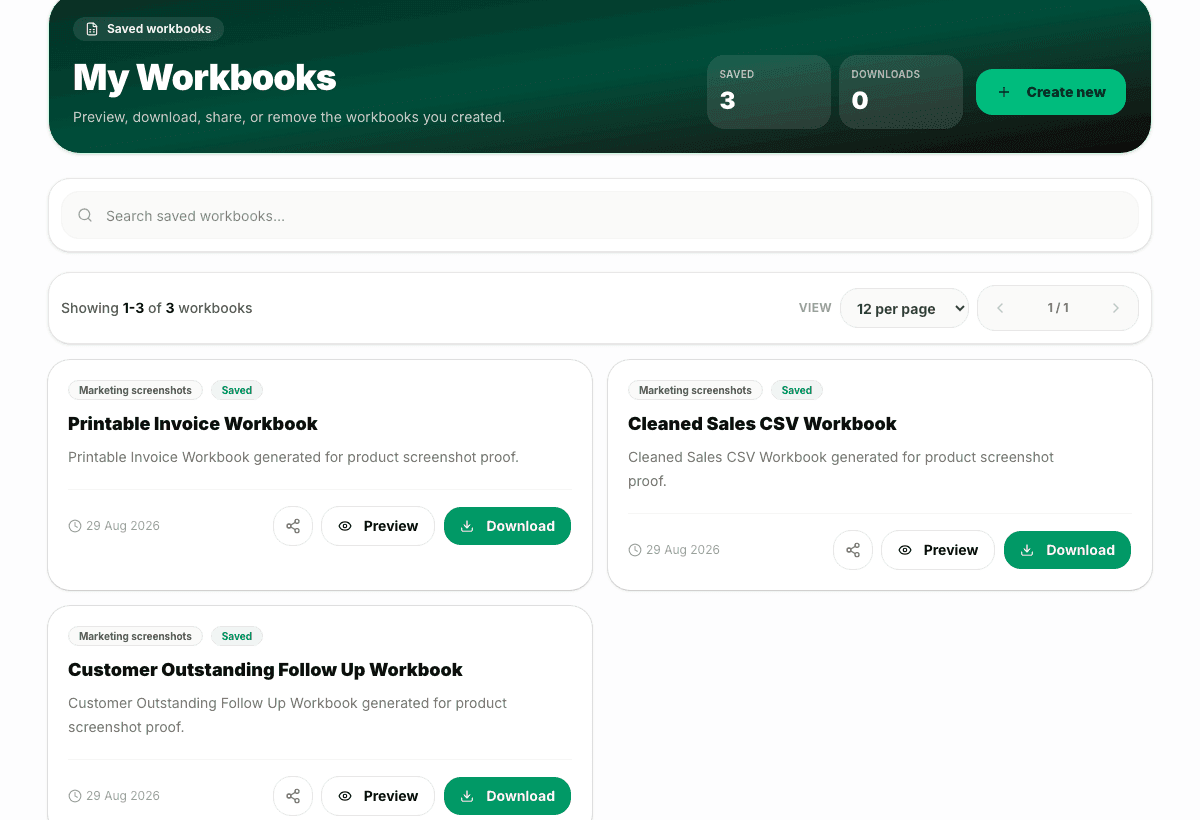
My Workbooks keeps custom and upgraded files separate from the public template gallery, with download, delete, share and export paths.
Preview
Saved workbooks
3 sample rows show the shape before users commit.
Validation
Checked output
Saved workbooks are tied to the user account.
Included
6 core areas
Private saved workbook list
Problem
Why this feature exists
When users create or upgrade files, they need a reliable place to return later. Without a saved workspace, every generated workbook becomes a one-time download that can be lost, duplicated or hard to share.
Approach
How WorkbookWise handles it
My Workbooks keeps custom and upgraded files in a private library. Users can reopen a saved workbook, download it, delete it, share it when supported, or use export paths without mixing personal files with the public template gallery.
Outcomes
What you can accomplish
Who it is for
Built around real workbook owners
Returning users
Need to reopen workbooks created last week or last month.
Business owners
Need one place for trackers, printable formats and upgraded Excel files.
Accountants
Need to organize reusable client-specific files.
Team leads
Need to share a workbook preview or download the latest version quickly.
Common workflows
Common tasks you can complete
How it works
From input to useful output
Create or upgrade
Use Create Workbook, Fix My Excel or printable flows to produce a user-owned workbook.
Save the result
The workbook is saved only after the user confirms the preview and output path.
Search the library
Use saved workbook search to find the file by title, prompt or summary.
Take action
Download, share, delete or export from the saved workbook surface.
Keep library clean
Remove stale versions so the workspace stays easy to scan.
Product example
Saved Workbook Library
A saved workbook list should make it obvious what the file is, where it came from and what action is available.
Included
What the flow covers
Trust notes
What it does
Core capabilities
Keep private generated workbooks in one place.
Download, delete or share saved files.
Open supported saved files in Google Sheets.
FAQ
Frequently asked questions
Is My Workbooks the same as Template Gallery?
No. Template Gallery is public ready-made files. My Workbooks is the user private saved library.
Can I delete saved workbooks?
Yes. Delete is part of the My Workbooks happy path.
Can I download a file again later?
Yes. Saved workbooks can be reopened and downloaded later.
Can saved files be shared?
Supported saved workbook share paths are available from My Workbooks.
Does this depend on storage reliability?
Yes. Artifact storage and saved workbook reliability are covered by launch hardening gates.
Related features
Continue exploring WorkbookWise
Create Workbook
Use the guided workbook helper when the ready-made library is not enough. If a template fits but your old data needs importing, use the separate Use My Data workflow instead.
Fix My Excel
Upload an Excel or CSV file, keep the original rows, and create a cleaner workbook with mapped columns, formulas, dropdowns, summaries and help notes. Use My Data is the template-specific version when you already picked a target workbook.
Google Sheets Export
Export ready-made and saved workbooks to Google Sheets or copy them to Drive after connecting Google, while keeping XLSX download as the stable source.
Related Excel formats
Start from a matching free workbook
Ledgers
customer ledger format in Excel
Use this customer ledger format in Excel when business owners and accountants need a clean workbook for customer opening balance, invoices, receipts and closing balance before review, sharing, filing or monthly reporting.
Expenses
expense tracker format in Excel
Use this expense tracker format in Excel when owners, freelancers and admin teams need a clean workbook for business expenses, categories, GST support and approval notes before review, sharing, filing or monthly reporting.
Assets
asset register format in Excel
Use this asset register format in Excel when offices, schools and operations teams need a clean workbook for asset IDs, purchase dates, location, warranty and status tracking before review, sharing, filing or monthly reporting.
Projects
project cost tracker format in Excel
Use this project cost tracker format in Excel when contractors, agencies and project managers need a clean workbook for planned cost, actual cost, vendors, approvals and variance review before review, sharing, filing or monthly reporting.
Ready to use My Workbooks?
This page explains the workflow in detail. The app is where the user creates, downloads, saves or exports the workbook.